EN
EN
 AR
AR
 NL
NL
 FR
FR
 DE
DE
 EL
EL
 HI
HI
 IT
IT
 JA
JA
 KO
KO
 PL
PL
 PT
PT
 RU
RU
 ES
ES
 TL
TL
 IW
IW
 ID
ID
 LV
LV
 LT
LT
 SR
SR
 SK
SK
 SL
SL
 UK
UK
 VI
VI
 SQ
SQ
 ET
ET
 GL
GL
 HU
HU
 MT
MT
 TH
TH
 TR
TR
 FA
FA
 AF
AF
 BE
BE
 KA
KA

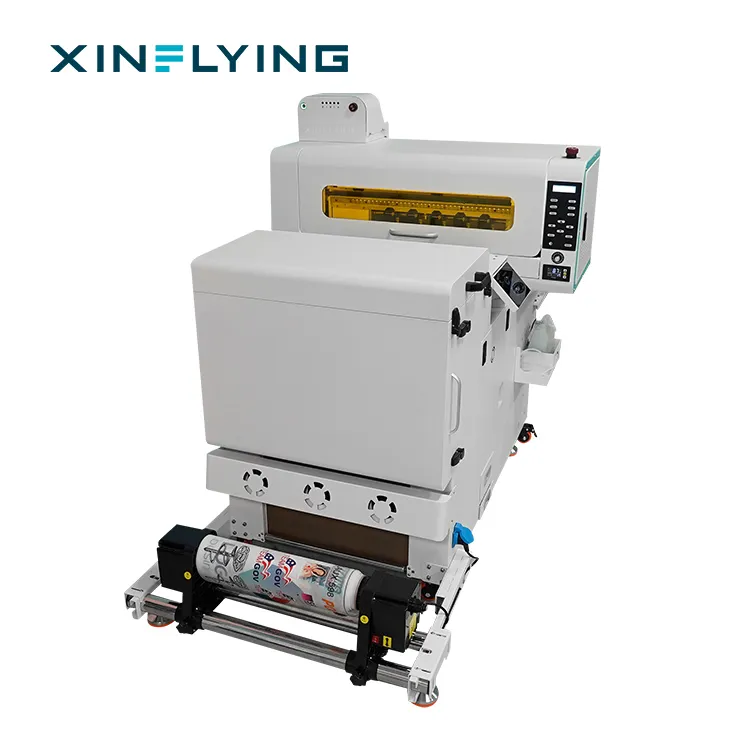
Direct-to-Film (DTF) printen heeft het bedrijf in kleding op maat/textieldecoratie opnieuw vormgegeven door zeer kleurrijk en uitzonderlijk duurzaam te zijn op alle soorten stoffen. De productiviteit van bedrijven en andere creatieve makers die gebruikmaken van A3-formaat DTF-printers, is afhankelijk van een vlotte en efficiënte werking. Toch kunnen er, zoals bij elke geavanceerde digitale printtechnologie, af en toe problemen optreden. Dit zijn typische problemen met A3 DTF-printers en oplossingen die de stilstand kunnen verminderen en een constante hoogwaardige uitvoer kunnen waarborgen. Deze handleiding bevat een lijst met eenvoudig te volgen probleemoplossingstips om ervoor te zorgen dat uw printer optimaal presteert.
Beeldproblemen en afdrukkwaliteit
De kwaliteit van de einduitdraai is een van de meest voorkomende problemen. Dit kan zich manifesteren als banding (witte lijnen dwars over de afdruk), gebrek aan levendigheid of zelfs onjuiste kleurweergave. Dergelijke problemen worden vaak veroorzaakt door verkeerde afdrukinstellingen of omgevingsfactoren. Om zeker te zijn dat u het juiste profiel gebruikt voor uw printermodel en folie, dient u eerst te controleren of u gebruikmaakt van afdrukprofielen die specifiek zijn voor uw printermodel en folietype. Een onevenwichtigheid hierin kan leiden tot een slechte inktdepositie. Vervolgens moet u ervoor zorgen dat de hoogte van uw printkop correct is afgesteld; een kop die te hoog staat, zal een onscherp beeld geven, terwijl een kop die te laag staat, de folie kan krassen. Omgevingsfactoren zoals lage luchtvochtigheid kunnen statische elektriciteit veroorzaken, waardoor stof wordt aangetrokken tot de folie, wat witte plekken oplevert in de uiteindelijke overdracht. Dit kan worden opgelost met behulp van een antistatische staaf of door ervoor te zorgen dat de luchtvochtigheid in de werkplaats normaal is.
Hardware en mechanisch problemen
Hardwareonderdelen zijn de werkpaarden van uw DTF-printer en hun goede werking is essentieel. Enkele veelvoorkomende mechanische problemen zijn variaties in het filmtransport, wat kan leiden tot uitlijnproblemen of verspilling van materiaal. Controleer altijd op vuil of resten op de transportrollen en zorg ervoor dat de film recht en strak is geladen. Een ander zeer belangrijk onderdeel is het printkopje. De belangrijkste oorzaak van strepen of ontbrekende kleuren in afdrukken zijn verstopte of gedeeltelijk geblokkeerde spuitmondjes. Reiniging van het kopje moet regelmatig plaatsvinden via het onderhoudsmenu van de printer. Handmatige reiniging met goedgekeurde reinigingsmiddelen kan nodig zijn bij aanhoudende verstoppingen. Volg altijd de instructies van de fabrikant om de gevoelige spuitmondjes van het printkopje niet te beschadigen.
Inktsysteem en Uithardingsproblemen
Het DTF-proces is gebaseerd op het nauwkeurige systeem van inkt en de hechtings- en poederbehandelefficiëntie. Problemen in dit geval kunnen de gehele overdracht in gevaar brengen. Als u merkt dat de laag witte inkt te dun of onregelmatig is, kan dit te wijten zijn aan een onjuiste instelling van de inkt of de noodzaak om aanpassingen aan het inktcirculatiesysteem door te voeren. Voor een gelijkmatige pigmenttoepassing dienen de witte inktcartridges voorzichtig te worden geschud en daarna in het printproces te worden geplaatst. Wat betreft het hechtingspoeder, is een van de uitdagingen een ontoereikende of ongelijkmatige poederaanbrenging. Dit leidt tot een brosse of slechte hechting na het uitharden. Zorg ervoor dat het trilsysteem van het poeder schoon is en gelijkmatig functioneert over de volledige breedte van de folie. Controleer ten slotte of uw uithardoven of warmtepers op de juiste temperatuur is ingesteld en deze behoudt. Ondervoerde prints zullen niet goed op de stof blijven kleven, terwijl oververhitting ze geel of breekbaar kan maken.
Werkstroom Hiccups en Software
Elke goede afdruk wordt ondersteund door een efficiënt digitaal proces. De problemen die vaak met software gepaard gaan, hebben meestal betrekking op mislukte communicatie tussen de computer en de printer of onjuiste kleurbesturing. Het is altijd het beste om de nieuwste en stabiele versies van de printertreiber en Raster Image Processor (RIP)-software te gebruiken die beschikbaar zijn voor uw apparaat. Als de kleuren vervaagd zijn of sterk afwijken van wat u op uw scherm ziet, reset dan uw kleurbeheerpipeline. Zorg er altijd voor dat u werkt in de juiste kleurruimte en dat uw computertools zijn geconfigureerd om overeen te komen met uw printer. Wat betreft bestanden: zorg ervoor dat uw ontwerpsoftware bestanden exporteert met een resolutie die hoog genoeg is voor scherpe en professioneel kwalitatief hoogwaardige overdrachten (meestal 300 DPI of hoger).
Preventief Onderhoud en Best Practices
De beste aanpak is problemen te voorkomen zodra ze zich aandienen. Het is veel kostenefficiënter om een strikt, gepland onderhoudsschema te hanteren dan om grote storingen te moeten herstellen. Dit omvat het dagelijks schoonmaken van de printkopafdichting en de wisser, het wekelijks controleren van alle bewegende onderdelen om zeker te zijn dat ze niet versleten zijn, en het maandelijks controleren van kabels en verbindingen. Het is altijd verstandig om verbruiksmaterialen van hoge kwaliteit te gebruiken, zoals folie, inkt en poeder die compatibel zijn met uw eigen A3 DTF-printermodel. Slechte materiaalkwaliteit kan leiden tot frequente verstoppingen, slechte hechting van het poeder en onregelmatige resultaten. Investeringen in kwalitatieve materialen en correct onderhoud zorgen ervoor dat de apparatuur lang meegaat en uw productie betrouwbaar blijft.
Hoewel oplossingen voor veel algemene problemen te vinden zijn via uitgebreid probleemoplossen, is goede technische ondersteuning onbetaalbaar. Voor gebruikers van printers van het bedrijf Guangzhou Xin Flying Digital Technology Co., Limited kan de toegang tot de goed ontwikkelde ondersteuningsmogelijkheden van het bedrijf leiden tot modelspecifieke instructies en geavanceerde oplossingen. Door actief onderhoud te plannen en intelligent fouten op te sporen, kunt u optimaal gebruik maken van uw A3 DTF-printsysteem en prachtige, duurzame designs voor klanten creëren.